
The idea started in a pretty dumb way. I’d been using ChatGPT and other conversational AIs to practice English for a while, and while it was cool to be able to talk to a machine, I always had this feeling that I was getting away with stuff. Speech recognition works on probability — if you say something remotely close to what’s expected, the AI gives it to you and moves on. You never really know if you pronounced it right or if the model just figured it out from context.
That’s not a criticism of those tools — they’re impressive — but they don’t solve what I wanted: an objective metric of my pronunciation. Something that would tell me: “you said exactly this, and this is how close it sounds to how it should sound.” And since I’m a software engineer, I thought: what if I build something that does exactly that? No bigger ambition than to see if I could pull it off, explore technologies I hadn’t used before, and end up with something useful for myself along the way.
How it works (keeping it short)
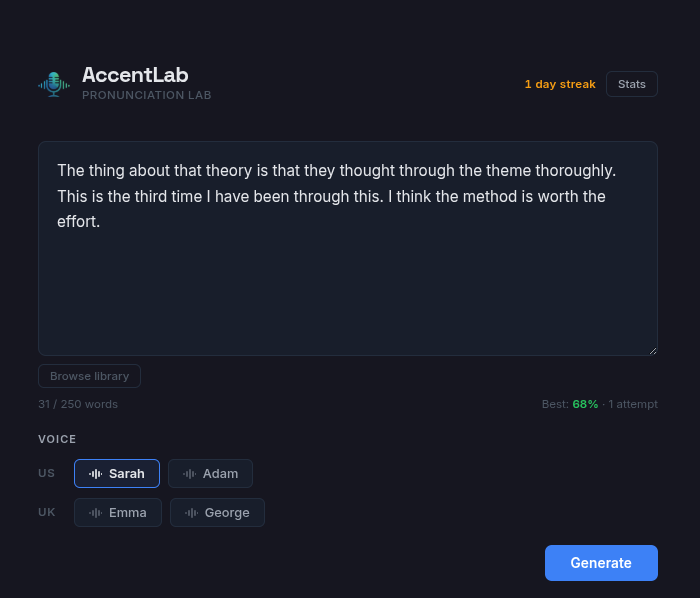
The idea is simple: you type some text, the app reads it out loud with local TTS, you repeat it by recording yourself, and it compares both versions word by word. Technically there’s some interesting stuff going on, but the concept is straightforward.
The full flow is:
- Enter some text in the UI (or pick one from the built-in library)
- The app generates reference audio with Kokoro ONNX — a TTS model that runs locally on my machine
- Listen and record your voice shadowing the speaker
- The backend processes your recording with faster-whisper to figure out what you said and when
- It acoustically compares each of your words against the native speaker’s using MFCC
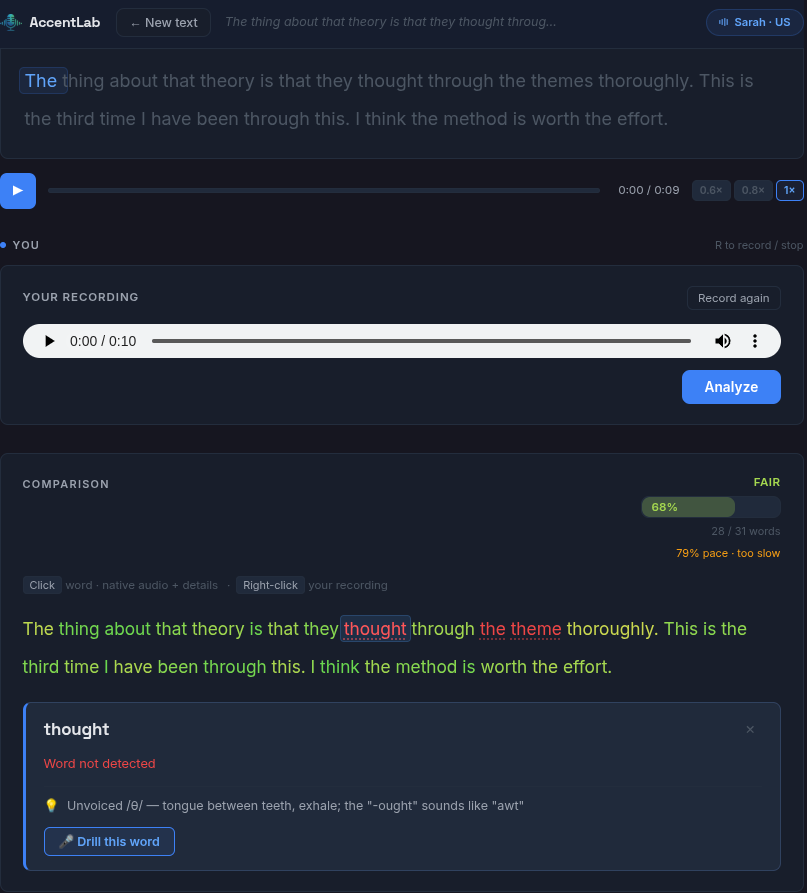
- You get a score with a breakdown: which words you nailed and which you didn’t
The technical part I had the most fun with
What I really wanted to explore with this project was audio processing, something I hadn’t played much with before. The core of the system is the acoustic comparison: I extract MFCC coefficients from both audio signals, normalize them, calculate the cosine similarity between the resulting vectors, and get a score.
It’s not cutting-edge science — pretty standard in the speech processing world — but seeing it work is satisfying. You combine that with the probability Whisper returns for each word (what I call clarity) and you get an evaluation system that’s much more honest than a transcription that accepts everything.
MFCCs measure how something sounds. Whisper measures whether it’s understandable. Together they balance each other out. If a word sounds similar but isn’t right (think ship for sheep), MFCC catches it. If you pronounce it with background noise, Whisper penalizes you. The system is pretty fair overall.
How it’s built
The architecture is the classic frontend-backend with a local model layer:
- Frontend: React with Vite and CSS Modules. Nothing fancy, just enough for a clean interface with synchronized karaoke highlighting and recording controls.
- Backend: FastAPI. Handles audio generation and analysis requests. Everything runs on the same server, no external dependencies.
- Models: Kokoro ONNX for TTS and faster-whisper for recognition. Both are loaded into memory on startup and stay warm.
- Data: Sessions and stats are stored in IndexedDB in the browser. No databases, no servers. Open the app, practice, close it — your data stays there.
The most fun part to build was the audio processing pipeline. When you record, the frontend applies an 80 Hz highpass filter (to remove breath and plosive noise) and a compressor to normalize volume. Then the backend receives the audio, processes it with Whisper to get timestamps, and finally slices each word and compares it against the equivalent chunk of the native audio.
What I’m taking away
The project started as a “let’s see what happens” and ended up being a tool I actually use. It’s not perfect and doesn’t pretend to be, but it does its job: telling you where you’re messing up without sugarcoating it.
If there’s one thing I’ve learned, it’s that sometimes it’s worth building something just because you want to understand how it works. And along the way, you end up with an app that helps you improve something you care about.
The code is on GitHub under the MIT license. It runs on Docker with or without a GPU.